Pages

Sunday, May 22, 2011

Best Free PC Tuneup / Cleaner softwares contd...

Why use this type of software?
After a fresh installation of your OS, as time passes, it will leave garbages like temporary files and other unnecessary files in your HDD. Also the registry becomes messed up. It is like living in room without cleaning or organizing it properly. It is necessary for OS that you clean and tuneup system for it to function properly and smoothly. This type of works include cleaning garbage files, organizing files, temoving unnecessary entries from registry. The following softwares are very good at this job.

1)Glary Utilites: I have discussed this previous day.

2)Wise Registry Cleaner:
Over time and registry junked-up, computer becomes slower and slower. Wise Registry Cleaner freebie does a neat job in cleaning out the Registry junk. It scans the Registry, flagging orphaned or bad Registry entries, and shows you the name and values for each. It identifies Registry entries that may be dangerous to delete, and those that are safe to delete, so you can distinguish between the two. It also lets you decide which entries to delete, and which to keep. For safety's sake, it can also back up your Registry before scanning, so that you can restore it, if the program causes any problems.


Features:
>>Scan the entire registry entries takes only a few seconds.
>>Backup registry make it safe to restore.
>>Defragment registry make your registry structuring.
>>Scheduled task enabling.
>>Very easy to use for novice users and pros alike.
>>Wise Registry Cleaner will greatly improve PC performance by removing and optimizing all the invalid registry entries and error items.
>>Unlimited Free technical support.


P.S.: Tomorrow I wiill post more in this category.

Saturday, May 21, 2011

Best Free PC Tuneup / Cleaner softwares

Why use this type of software?
After a fresh installation of your OS, as time passes, it will leave garbages like temporary files and other unnecessary files in your HDD. Also the registry becomes messed up. It is like living in room without cleaning or organizing it properly. It is necessary for OS that you clean and tuneup system for it to function properly and smoothly. This type of works include cleaning garbage files, organizing files, temoving unnecessary entries from registry. The following softwares are very good at this job.


1)Glary Utilites:
Glary Utilities Free is an all-in-one package that includes a variety of system tools to help you clean your PC from junk files, remove Internet traces, find invalid registry entries, manage startup programs, optimize system memory, defrag the registry, and more. The program also includes a disk space inspector to locate large folders and files, a Context Menu Manager to disable unused right-click options for files and folders and a duplicate file finder. Other features include and Internet Explorer Assistant, a Privacy Shredder for secure file deletion, a file undelete tool and an encryption/decryption tool.

Features:
>>Optimize, clean and boost the speed of your Windows.
>>Protect your privacy and security.
>>Block spyware, trojans, adware, etc.
>>Fix certain application errors.
>>Simple, fast and User friendly interface

To call Glary Utilities helpful would drastically understate the situation. It hopes to become your INDISPENSABLE friend with its one-stop-shop utilities for optimizing and maintaining your PC for best performance. My friend, welcome to have a try for Glary Utilities and have your say! 

CategoryModules
Clean Up & RepairDisk Cleaner
Removes junk data from your disks and recovers disk space
Registry Cleaner
Scans and cleans up your registry to improve your system's performance.
Shortcuts Fixer
Corrects the errors in your startmenu & desktop shortcuts
Uninstall Manager
Uninstalls programs completely that you don't need any more
Optimize & ImproveStartup Manager
Manages programs which run automatically on startup
Memory Optimizer
Monitors and optimizes free memory in the background
Context Menu Manager
Manages the context-menu entries for files, folders...
Registry Defrag
Defrag the Windows registry to speed up your computer
Privacy & SecurityTracks Eraser
Erases all the traces,evidences,cookies,internet history and more
File Shredder
Erases files permanently so that no one can recover them
File Undelete
Quick and effective way to retrieve accidentally deleted files
File Encrypter and Decrypter
Protects your files from unauthorized access and use.
Files & FoldersDisk Analysis
Shows you the disk space usage of your files and folders
Duplicate Files Finder
Searches for space-wasting and error producing duplicate files
Empty Folders Finder
Finds and removes empty folders in your windows
File Splitter and Joiner
Splits large files into smaller manageable files, and then rejoin them.
System ToolsProcess Manager
Monitors programs that run on your PC and stop spyware and Trojans.
Internet Explorer Assistant
Manages Internet Explorer Add-ons and restores hijacked settings
Windows Standard Tools
Provides direct access to the useful windows default functions.


Official Download Page


P.S.: Tomorrow I wiill post more in this category.

Friday, May 20, 2011

Best Free Partition Manager softwares 2

Why use third party partitioning softwares?
The partitioning softwares that shifts with OS, erases all data from the operating partition, even if the change is made is very little. This is why comes third arty partitioning utilities. In many cases like splitting a partition or merging two partitions will not cause any data loss if used third party partitioning softwares.

Here I am going to let you know about some of free partition managers which are best by peoples choice.

Previously I talked about EASEUS Partition Master (Home Edition). Now I am goin to talk about 2 more partition tools.


2)MINITOOL Partition Wizard Home Edition:
MiniTool Partition Wizard Home Edition is a free partition manager software designed by MiniTool Solution Ltd. Our partition manager supports 32/64 bit Windows Operating System including Windows XP, Vista and Windows 7. Home users can perform complicated partition operations by using this powerful yet free partition manager to manage their hard disk. Functions include: Resizing partitions, Copying partitions, Create partition, Delete partition, Format partition, Convert partition, Explore partition, Hide partition, Change drive letter, Set active partition, Partition Recovery. 
MiniTool Partition Wizard Home Edition is designated for home user only, to use MiniTool Partition Wizard in a business environment, MiniTool Partition Wizard Professional Edition is required.


Main Features:
>>Support Windows 2000/XP/Vista/windows 7 (32 bit & 64 bit) operating system.
>>Support RAID.
>>Extend system partition to maximize computer performance.
>>Manage the hard disk for substantial performance increase.
>>Create, Delete and Format partitions with simple steps.
>>Disk Copy to protect or transfer data.
>>Support disk and partition size larger than 2 TB.
>>Convert partition format from FAT to NTFS.
>>Partition Copy: Copy the entire content of one hard disk to another.
>>Copy Disk Wizard: Copy the entire hard disk to another without having to reinstall Windows.
>>Disk Map - Visually demonstrate your disk/partition
configuration; preview the changes before applying.
>>Hide/unhide partition, set active partition, etc. - Change partition properties easily.
>>Explore FAT/NTFS partition.
>>Set partition as primary.
>>Set partition as logical.
>>Rebuild MBR.
>>Disk Surface Test.
>>Partition Surface Test.
>>Change Partition Serial Number.
>>Change Partition Type ID.
>>Hot Extend Partition without reboot.


Best Free unlocker / enabler softwares

I) Unlocker:
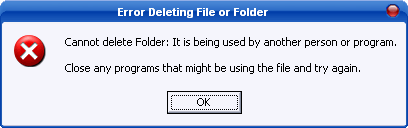
If you've ever been unable to delete a file in Windows, and can't figure out what program's using it, Unlocker is the solution. Have you ever seen these Windows error messages?


  • Cannot delete folder: It is being used by another person or program
  • Cannot delete file: Access is denied
  • There has been a sharing violation.
  • The source or destination file may be in use.
  • The file is in use by another program or user.
  • Make sure the disk is not full or write-protected and that the file is not currently in use.
Unlocker can help! Simply right-click the folder or file and select Unlocker. If the folder or file is locked, a window listing of lockers will appear. Simply click Unlock All and you are done!

Unlocker is the solution!
1. Simply right click the folder or file and select Unlocker

    2. If the folder or file is locked, a window listing of lockers will appear

    3. Simply click Unlock All and you are done!


Similar programs and why Unlocker is better
Of course I only compare here the unlocking features. Process Explorer and Take Control are very good programs featuring much more things than just unlocking folders. The goal of this list is not really to pretend Unlocker is better but instead to provide a list of all other alternative programs in case you have some difficulties with Unlocker.


Here is the link to the official download site of the Unlocker: http://www.emptyloop.com/unlocker/#download


II)Windows Enabler:
Windows Enabler is a program that runs on Microsoft Windows 95/98/Me/NT4.0/2000 and WinXP. It allows the user to enable disabled windows and controls such as buttons and tick boxes and choose menu options that would normally be disabled. This is obviously a very dangerous practice if used recklessly but having said that, you’d be surprised at how often it comes in handy. Windows Enabler has a very simple user interface; it appears as an icon in the system tray and can be turned on and off simply by clicking on it. Windows enabler may be freely distributed as long as the entire package (or a superset) is distributed unaltered. 

Using Windows Enabler: 
To run Windows Enabler execute the file “Windows Enabler.exe”; the simplest way to do this is to place a shortcut to it somewhere on your system such as the desktop, the start menu or the “Startup” program group. When Windows Enabler is running you should see one of the following icons in the system tray:  or  . To exit the Windows Enabler right click on the icon and choose “Quit” from the popup menu. An about box can be displayed by right clicking on the icon and choosing “About” from the popup menu. Left clicking on the icon toggles the Windows Enabler on and off. When the Windows Enabler is active the word “On” is superimposed on the icon as seen in the second icon above. 

For example here is a dialog box from an application. As you can see most of the controls on this dialog box are disabled and therefore can not be pressed or edited:

Here is the same dialog but the “Windows Enabler” is used to enable some of the controls. We can now use these controls but how the software will react can vary greatly. Sometimes the results are disastrous, YOU HAVE BEEN WARNED!! 

Best Free Partition Manager softwares

Why use third party partitioning softwares?
The partitioning softwares that shifts with OS, erases all data from the operating partition, even if the change is made is very little. This is why comes third arty partitioning utilities. In many cases like splitting a partition or merging two partitions will not cause any data loss if used third party partitioning softwares.

Here I am going to let you know about some of free partition managers which are best by peoples choice.

1)EASEUS Partition Master (Home Edition)
As Partition Magic alternative, EASEUS Partition Master freeware is an ALL-IN-ONE partition software and the most convenient hard disk partition manager toolkit including Partition Manager, Disk & Partition Copy Wizard and Partition Recovery Wizard on MBR and GUID partition table (GPT) disk under Windows 2000/XP/Vista/Windows 7 and Windows Server 2000/2003/2008 (32 bit and 64 bit). 

It allows users to Resize/Move Partition, Extend System Drive, Copy Disk & Partition, Merge Partition, Split Partition, Redistribute Free Space, Convert Dynamic Disk, Partition Recovery and much more. You can free enjoy EASEUS Partition Master Home Edition like the commercial Partition Magic software.

Saturday, May 14, 2011

Best Freeware softwares

What is a Freeware?
Freeware (from "free" and "software") is computer software that is available for use at no cost or for an optional fee, but usually with one or more restricted usage rights. Freeware is in contrast to commercial software, which is typically sold for profit. The term does not imply that the software is free and open source software (FOSS). Freeware is a loosely defined category, which includes both closed and open source proprietary software.

What is a Pay ware or Commercial Software?

Commercial software, or less commonly, payware, is computer software that is produced for sale or that serves commercial purposes.
Commercial software is most often proprietary software, but free software packages may also be commercial software.
All or parts of software packages and services that support commerce are increasingly made available as free software[citation needed]. This includes products from Red Hat, Apple Computer, Sun Microsystems, Google, and Microsoft Corporation. Microsoft Corporation uses "commercial software", to describe their business model.

In my blog, I am going to tell you about some freewares that are totally free and their performance and quality are better than some paid softwares of the same category.